
SIGforum.com Main Page What's Your Deal! Part 3 - Now my daughter’s phone, Nothing is easy with Apple
Main Page What's Your Deal! Part 3 - Now my daughter’s phone, Nothing is easy with AppleGo | New | Find | Notify | Tools | Reply | |
| Savor the limelight |
Part 3 - August 17, 2026 An hour into transferring her 15 to her 17, stuck in a transfer loop direct between the phones. Trying the backup restore route with her M5 Pro MacBook Pro and get this: 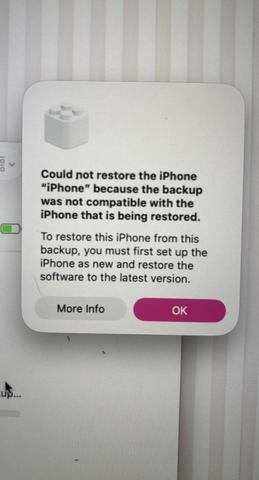 Part 2 - July 28, 2026 Backed up my son’s phone to my computer. He has 200GB of 256GB used. I fix what needed fixing, go to restore the backup, which of course requires erasing the phone first. The restore process starts, then stops and says the phone doesn’t have enough storage to restore the backup. An hour on the phone with Apple and the best they could come up with was buy a phone with more storage, restore the backup to that phone, copy the photos and videos off the phone to my computers, erase the photos and videos from the phone, do a new backup from the new phone, restore that backup to the old phone, return the new phone, and copy the photos and videos from my computer back to the old phone. Yeah, that’s easy. Guy said this happens a lot and agreed it’s broken. Since I have to take my son’s friends 3 1/2 hours to the airport in Flint on Thursday, what’s another 45 minutes to Novi. Original thread: Seriously. This time I’m trying to backup my phone to my computer. Apparently, iTunes doesn’t do that anymore and you need a new app called Apple Devices. It only took 55 minutes of trouble shooting to figure that out. Open the app, connect the phone, and the app wants the old password to do encrypted backups. I did a backup 2 years ago of my old phone to transfer everything to this phone. Heck if I remember that password. Had to do encrypted to save all my WiFi networks and passwords. Another 45 minutes and it seems the password is on my phone and the only way to remove it is to reset all settings. Fine, but I want to restore all my passwords, so I pay $3 to get enough iCloud storage space to backup my phone. Supposedly, all the settings and passwords will be backed up as well. Reset all my settings, go to restore them from my newly created iCloud backup, and what the fuck? You have to restore the entire backup? OK, except you can’t restore the entire backup without wiping the entire phone! OK, try to wipe the entire phone and guess what? You need your Apple Account password. That got wiped out of my phone when I reset the settings. I’ll just reset the password, right? Not so fast. It would have been easy if my phone was still logged into my account, but no. It wants my phone number and my passcode. No problem, those have been the same for 15 years. Problem, it says my passcode that I’ve een using for 15 years is wrong. I hit “continue without passcode” and it says I’ll have to wait until I get an email tomorrow and that email will tell me how long I have to wait to reset my Apple Account password. Four hours wasted. All I want to do is restore my settings, WiFi networks and passwords. This all started because my daughter’s iPhone is having an intermittent microphone problem, she’s going to a concert this weekend, and wants to take some video. I figured no problem, Apple makes it easy to back your phone up and restore it to another phone, so we’ll just swap phones easy peasy. Nope.This message has been edited. Last edited by: trapper189, | ||
|
| Technically Adaptive |
Seems odd, are you backing up to a Mac computer? I use a USB to phone cable and go from there. | |||
|
| Savor the limelight |
Windows 11 machine with 2.5TB of free SSD space using usb-c cord. Unfortunately, our iPhone 15s are limited to USB 2.0's 480 mbps. I didn't catch that before we bought them. | |||
|
| Technically Adaptive |
OK, I have never tried that with a Windows machine. | |||
|
Member |
I suggest simply using Apple settings to always backup your data to your AppleID on the Apple iCloud. That is easy. Why would you want to backup to a physical drive? ------- Trying to simplify my life... | |||
|
| Savor the limelight |
Because it’s mine and I have no need to pay fees to store my things on someone else’s physical drive. | |||
|
Baroque Bloke |
You’re surely making it hard on yourself to save $3 per month. Different strokes for different folks, I guess. Serious about crackers. | |||
|
Honky Lips |
Yatzee And unless you're absolutely sure you require windows, buy a Mac you life will be significantly easier. _____________________________________________ Proverbs 3:31 "Envy thou not the oppressor, and choose none of his ways." | |||
|
| Savor the limelight |
I paid the $3 and still cannot restore my settings. The fucking $3 is not the problem. The problem is nothing is easy with Apple. I have long history with Apple products not working. Buying a MacBook Probhas not made my life easier, period exclamation point. This is actually the second time having problems like this with the stupidphones. It took three days to finally get my iPhone 12 Pro transferred to my new iPhone 15. At the same time, I did the phone to phone transfer with my daughter’s iPhone 11 to her new iPhone 15 and it went exactly like it should have. I didn’t do anything different with mine, it just wouldn’t work. | |||
|
| Baroque Bloke |
Millions of people find the Apple ecosystem to be relatively user-friendly. Even my sister-in-law thinks so. You might ponder that. Serious about crackers. | |||
|
| Ice age heat wave, cant complain.  |
While I dont find anything about Apple to be complicated, especially compared to PC, I'm also one who has been backing up to hard drive(s). It's been a little bit but I saw the changes coming with iTunes and ive been avoiding it. It's possible I need to move to cloud based but I dont want to. I'm still on Trappers side with respect to a physical drive. NRA Life Member Steak: Rare. Coffee: Black. Bourbon: Neat. | |||
|
| Member |
I pay 99 cents a month for data storage to Apple (old contract, I guess.) I find everything works smoothly. For example, if I type a grocery list in Notes on my Mac, it appears on my phone. Several years ago when my job required Windows, I bought a program that allowed me to run Windows on my Mac. But hey, different strokes. | |||
|
| Savor the limelight |
Got the email from Apple and I have to wait until July 14 to be able to restore my iCloud backup of my iPhone. This would take an hour or less for any other company, but 5 days for Apple. Yep, so easy. | |||
|
| Savor the limelight |
Supposed to get a phone call or text this morning to unlock my Apple ID and that didn’t happen. Now I’m on hold with Apple, they are using my call for a live support training class. Training class didn’t learn anything, so they escalated my case to the next level. The guy came to the conclusion he that I have to keep my phone either turned off or in airplane mode for however long their system says it will take to be allowed to continue the process of changing my password. That 5 days this last time. The reason I didn’t get the text or email they said I was going to get is because their system could see my phone and cancelled the recovery process without telling me. So now I have to buy a burner phone tomorrow, turn my iPhone off for 5 days to recover my Apple Account to restore my phone’s iCloud backup. Doesn’t get any easier than this, does it?This message has been edited. Last edited by: trapper189, | |||
|
| Member |
Bought the wife a new Ipad. She had the same issues transferring data from the old one | |||
|
| No More Mr. Nice Guy |
Transferring everything to a new iPhone has gotten easier and easier with every iteration for me. I'm in the Apple ecosystem, which makes it a breeze. I backup my phone every month or so, mostly to keep all the photos backed up. Everything syncs across the iMac, iPad, and iPhone seamlessly. My only complaint is that the number of settings to change for maximum privacy keeps increasing. | |||
|
| Member |
I have an iPhone 7 with an inaccessible Apple ID (long story) with lots of pictures on it. All I want is to transfer the pictures from it to another device. The phone is not active (calls / texts) and is used as my alarm clock at the moment. I went to a local Apple store to see if they could help. Nope. Now if I were a middle eastern terror guy, I'm sure they could do it, to alert the FBI. (sarcasm intended) Any thoughts on this? | |||
|
| Technically Adaptive |
If the other device is a Mac. you should be able to do it, if the screen is not passcode locked. | |||
|
| Member |
I'm going through the same gauntlet line of password change with Apple, it's indescribably ridiculous. On my 3rd Apple Advisor, simply because their 'advice' has triggered the auto time-out, setting us back another 24hrs each time. All over a new Ipad, our only Apple product which my wife had forgotten her Apple account password on her old Ipad which has a completely dead battery. Reminds me why we're A Android/Google centric instead. | |||
|
| Savor the limelight |
I wish you luck. You have to have another Apple device in order to initiate an Apple Account password reset. You use an app, Apple Support, to do this. I used my son's phone last night and am now waiting for the email that will tell me how long I have to wait before the process continues. Without another Apple device, the alternative is to go to an Apple store and use one of theirs. The nearest of which is 237 miles away. You can use a friend's as well. | |||
|
| Powered by Social Strata | Page 1 2 3 |
 | Please Wait. Your request is being processed... |
|
SIGforum.com Main Page What's Your Deal! Part 3 - Now my daughter’s phone, Nothing is easy with Apple
Main Page What's Your Deal! Part 3 - Now my daughter’s phone, Nothing is easy with Apple© SIGforum 2026