
SIGforum.com Main Page What's Your Deal! Part 3 - Now my daughter’s phone, Nothing is easy with Apple
Main Page What's Your Deal! Part 3 - Now my daughter’s phone, Nothing is easy with AppleGo | New | Find | Notify | Tools | Reply | |
| No More Mr. Nice Guy |
If you lose your device, which probably has everything on it that would allow a thief to steal your identity and empty your bank accounts, do you want the password reset to be quick and simple? | |||
|
| Savor the limelight |
Don't be stupid and tell me you cannot see how what I'm going through is the result of a broken system and not because you think I'm impatient, lazy, feel entitled, or whatever. I'm on day 8 of trying to get this resolved. I followed Apple's instructions from their website to resolve the initial issue. At no point in those instructions or in the on screen warnings did they say to make sure I knew my Apple ID password. Changing it at that point would have taken 2 minutes. Reseting All Settings on my phone removed my Apple ID password. Without it, I cannot restore my phone's iCloud backup because they want the password. I can't sign out of the account on my phone because they want the password. I can't reset my phone back to factory because they want the password. There's zero reason Apple couldn't and shouldn't have required the same before allowing people to wipe out the password from the phone. That's a broken system. Forcing people to wait an arbitrary period of days where Apple is doing nothing at all to verify who I am is a broken system. Apple's system canceling my request to reset my password during the arbitrary waiting period is a broken system. The fact that I have started the process again, have my phone turned off and unable to use until this gets resolved, and have yet to receive the new email telling me how long the arbitrary waiting period will before I can continue resetting my password indicates the system is still broken. | |||
|
Honky Lips |
So if I understand you correctly the mulitrillion dollar company, with billions of users, and thousands of employees's who's entire career is cyber security has a "broken system" for account recovery because you can't remember a password that you yourself set? Am I understanding you correctly? _____________________________________________ Proverbs 3:31 "Envy thou not the oppressor, and choose none of his ways." | |||
|
| No More Mr. Nice Guy |
The system to protect the owner from crime isn't broken, but their customer support has been a fail for you. There is no excuse for their customer support not following through with emails or phone calls. My comment, though, stands in general. Most of us have banking, government accounts, employer related accounts, email, and probably other sensitive information on our device. You don't want a thief to call your cell phone maker, Apple or otherwise, and easily reset the pw. The value of a stolen phone is also much less if unlocking it is difficult without the AppleID pw, making theft less enticing (hopefully). My wife's first husband died suddenly. Apple would not give her access to his locked phone absent a court order or legal written documentation from the estate executor. As it should be. It wasn't worth the time to pursue it further, so she junked it. | |||
|
| Savor the limelight |
I spelled it out and their system is broken. Day 11: I did get the go ahead to reset my Apple Account password after waiting 5 days with my phone turned off. Unfortunately, I used my son’s phone to do so, thought I was done, gave it back to him, and he took off into the woods. Later on during the process of setting up my phone and logging into my Apple Account with my newly created password. it wanted to send a text verification to either my phone or my son’s phone. My phone couldn’t receive texts because it wasn’t set up yet and my son was off in the woods. I use my wife’s phone to call my son and have him bring his phone back. Now, because it took too long my phone is on its lock screen and wants the passcode. Great! I just set it up, verified it, and used the same one I’ve used for six years except it doesn’t work. Call Apple and spend an hour talking to the woman as she walks my through plugging the phone into a computer to put it in recovery mode. Spend another hour of my own time restoring my iCloud backup only to find my messages, settings, and WiFi SSIDs/passwords did not restore. Call Apple again and spend 1.5 hours getting my messages back onto my phone. I’m not making this up, but at one point he had me hit a button that said doing so would delete all of my messages. Unfortunately, we couldn’t restore my settings or WiFi SSIDs/passwords as a iCloud backup does not backup everything. I vaguely to be the reason I back our phones up to a computer in the first place because everything gets backed up. Using iCloud backup requires you to have your settings and passwords synced in iCloud and they are not saved as part of the backup. I am completely 100% against storing my passwords, data, photos, whatever on someone else’s computer. None of what I went through was easy, none of it made my phone any more secure from a someone picking it up off the street. In fact, I’d argue not being able to reset my Apple Account password for 11 days made my phone less secure because I couldn’t sign out of my Apple Account without the password which left it more vulnerable. I’ve restored computers running Windows from backups, I’ve reinstalled Windows from scratch along with all the applications when buying a new computer. In 40+ years of using computer running Microsoft and IBM OSs, I’ve never had to call Microsoft or IBM to figure something out. 11 days and 5 hours, not hold, but actually talking to Apple to reset a password and restore a backup is not an easy process. Now I get to back my phone up again, back my daughter’s phone up, both iPhone 15s, and swap phones to see if my daughter’s intermittent microphone problems are hardware or software. | |||
|
Member |
How dare you!  I gave up on apple a long time ago. Never looked back. Don't regret it. | |||
|
| Savor the limelight |
My premise is preposterous, right? The only reason I have an iPhone is because my wife had one. It was so easy to use that she couldn't figure it out. It's easy now because she just asks me. I used my daughter's M5 Pro MacBook Pro today to put my phone into recovery mode. The Apple woman says, "click Finder, it's the two faced icon". Really? I would never in a million years have guessed the two faced icon is how you get at your files on a Mac. | |||
|
| Savor the limelight |
Part 2 - July 28, 2026 Backed up my son’s phone to my computer. He has 200GB of 256GB used. I fix what needed fixing, go to restore the backup, which of course requires erasing the phone first. The restore process starts, then stops and says the phone doesn’t have enough storage to restore the backup. An hour on the phone with Apple and the best they could come up with was buy a phone with more storage, restore the backup to that phone, copy the photos and videos off the phone to my computers, erase the photos and videos from the phone, do a new backup from the new phone, restore that backup to the old phone, return the new phone, and copy the photos and videos from my computer back to the old phone. Yeah, that’s easy. Guy said this happens a lot and agreed it’s broken. Since I have to take my son’s friends 3 1/2 hours to the airport in Flint on Thursday, what’s another 45 minutes to Novi. | |||
|
| Savor the limelight |
Can’t book a Genius Bar appointment on Apple’s website. It defaults to my current location and says there are no stores nearby. I select the store I want the appointment at, but it keeps defaulting to my current location. Call the store direct, right? I get the ever helpful AI that understands complete sentences, tell it I want the book an appointment, and it sends me a text with a link to where I was in the first place. Call again, tell the ever helpful AI the link doesn’t work, and get routed to the same Apple tech support person I spoke to yesterday and he kindly books the appointment for me. 30 minutes to book and appointment, so easy. | |||
|
| Savor the limelight |
Arrived at 4:15pm for my 4:30pm appointment, it’s 4:35pm. Drove 282 miles, 4 hours and 15 minutes and here I sit waiting patiently to get my son’s phone fixed: 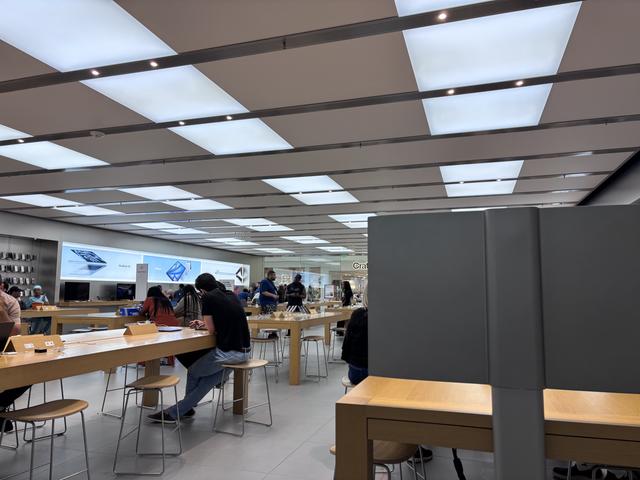 So easy. | |||
|
Shall Not Be Infringed |
Note to self: NEVER attempt to Activate, Backup, or Restore an iPhone while located in the State of Michigan! ____________________________________________________________ If Some is Good, and More is Better.....then Too Much, is Just Enough !! Trump 47....Making America Great Again! "May Almighty God bless the United States of America" - parabellum 7/26/20 Live Free or Die! | |||
|
| Green grass and high tides  |
 As a new iphone user. I get it trapper. As a new iphone user. I get it trapper. 94Hokie gave me samsung phone a few years ago that my wife uses now. She is a newer mac user and seems to like it. Me with the phone, its growing on my but I just might trade phones with my wife. "Practice like you want to play in the game" | |||
|
| Savor the limelight |
I mean I’m a figure it out myself person and I do a fairly good job of it. My experience over the last three weeks trying to fix 3 iPhones matches the sum total of fixing all other computing devices I’ve done in the last 45 years and the 3 phones aren’t even fixed yet. We left the Apple Store at 7:30 and got home around midnight. The good news is my son got a couple night driving hours on his learner’s permit. Of course Apple doesn’t allow the non-pro models to have USB 3 data transfer rates up to 10gbps, but limits them to 480mbps USB 2 rates, which worked out to be a realized 290mps restoring the backup of my son’s phone to the new larger phone. It wouldn’t have finished before the store closed. I started the process when we got home and let it rip. This morning all of his 210Gb of his stuff is on the new phone. Neither Genius that “helped” us yesterday could explain why a backup of 210Gb worth of stuff couldn’t fit on the 256Gb phone the backup was made from. The phone reported it had 240Gb free when the restoration process started. Right now we are transferring everything from the mew phone back to the old one which the phone reports will take 11 hours. | |||
|
| Savor the limelight |
And here we go again. Part 3 - August 17, 2026 An hour into transferring her 15 to her 17, stuck in a transfer loop direct between the phones. Trying the backup restore route with her M5 Pro MacBook Pro and get this: 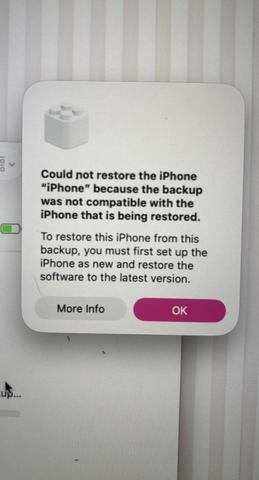 She tried to do the process on her own without my help before she called me and she’s been using Apple devices since she was 6. | |||
|
| Member |
Just get the cloud, all of this would have been solved. NRA Life Member | |||
|
| Savor the limelight |
I got the icloud and it didn’t work. Typical excuse, I didn’t have the right Apple product or pay for the right Apple service to make it work. I’ve been listening to how everything Apple just works for 40 years and it’s somehow always my fault when Apple’s shit doesn’t work.  There’s zero reason an iPhone to iPhone direct transfer should not work. There’s zero reason an iPhone backed up to a MacBook Pro shouldn’t be able to be restored. | |||
|
| Technically Adaptive |
If her old phone is working normal, reset the new phone to factory settings and start over. You should be able to set them next to each other and follow the prompts. You can do it through a MAC machine with backup also. Sounds like the new phone was altered someway. | |||
|
| Savor the limelight |
Is the M5 Pro MacBook Pro that I mentioned she’s having trouble with the backup and restore process and posted a screenshot from not a “MAC machine”? I had her reset the new phone and use her MacBook to update the new phone to the latest iOS. After doing that, it seemed to do the phone to phone transfer. Unfortunately, when we checked the new phone after it was supposedly finished, half of her data didn’t transfer. She’s trying restore the backup from her MacBook again right now. I do appreciate the suggestion.  And I’m fabricating and aluminum shield to keep the leaking oil off the exhaust. We’re leaving on Wednesday now. | |||
|
| Technically Adaptive |
Hopefully she is using encrypted backup, if not, anything that requires a password on her old phone may or may not transfer. Other than that, I don't know what the deal could be. | |||
|
| Savor the limelight |
Encrypted backup with a stupid simple password. My first post goes into detail about the lesson learned from that fiasco. tl;dr I did an encrypted backup of my phone two years ago to transfer everything my new phone at the time and fixing that in July this year took 11 days and 5 hours of talking on the phone with Apple. Not 5 hours on hold, but 5 hours actually talking. | |||
|
| Powered by Social Strata | Page 1 2 3 |
 | Please Wait. Your request is being processed... |
|
SIGforum.com Main Page What's Your Deal! Part 3 - Now my daughter’s phone, Nothing is easy with Apple
Main Page What's Your Deal! Part 3 - Now my daughter’s phone, Nothing is easy with Apple© SIGforum 2026