July 05, 2021, 10:16 AM
cyberphobiawell that did not work twice
July 05, 2021, 10:28 AM
cyberphobiais just the photo suppose to come up or the whole flickr page
June 10, 2022, 05:42 AM
khocrap again. using this thread to figure out how to post pictures. I thought I was following the instructions but no joy. if anyone can yell me what I am missing it would be appreciated.
June 10, 2022, 10:06 AM
RogueJSKquote:
Originally posted by kho:
if anyone can yell me what I am missing it would be appreciated.
Yell? Okay...
*ahem* COPY AND PASTE THE "BBCode" LINK FROM FLICKR INTO YOUR SIGFORUM POST, NOT THE "Share" LINK LIKE YOU DID BEFORE: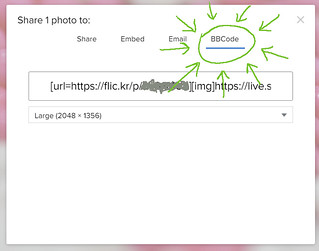 LIKE SO:
June 10, 2022, 06:04 PM
khoAhhhhh.
I used share not BBCode.
Sometimes I respond better to yell than tell.
Thank you!
June 11, 2022, 05:51 AM
khoI guess I need to ask one more question if I may. What size did you use for my picture?
June 18, 2022, 08:52 AM
Ronin1069Are you able to get the Flickr BBC code from a mobile device or just a laptop? For the life of my I cannot find it on my iPad or phone.
ETA: I found it on the website from my iPad; just not on the app.
January 04, 2023, 10:00 AM
sigseller2000testing this also

[img]https://live.staticflickr.com/65535/52607201833_f1c8ca53b1.jpg">
66D4DAD9-97C9-40A7-A589-9595A4D6BE65 by
Brett Milo, on Flickr[/IMG]
January 04, 2023, 11:24 AM
parabellumquote:
Use just the url, take everything else out of there.
Remove the carets from this url and paste the url between the IMG tags.
<https://live.staticflickr.com/65535/52607201833_f1c8ca53b1.jpg>
Then, you get this:

February 25, 2023, 01:36 PM
cyberphobiayes sir great idea
March 31, 2023, 02:44 AM
pherbstI'm with MongO..I tried to post a photo and thought it worked but turns out it didn't.
August 09, 2025, 12:10 PM
BroadsideWARNING!!!!! Resurrecting a two-year-old thread.
I know this is stickied. But I still thought I should be safe and warn everyone that the last post was over two years ago.
So it is now August 2025. Is there a preferred hosting site to use for photos?
I need to post a photo in the Armorer's Section and in 24 years, 6 months and 18 days of being a member here I have never posted a photo on SigForum.com.
August 09, 2025, 04:06 PM
12131flickr.com
imgur.com
postimage.org
August 09, 2025, 06:07 PM
dsietsI use Imgur.com
1)Make an account at Imgur.com
2)At the top left is "+ New Post", click it.
3)You now have 3 ways to upload your pic to Imgur. I usually click "choose photo" and select it from my photos folder, double click the photo.
4) This pic is now uploaded and while logged in, find the photo by click in the upper right corner your account name and select "Posts". Your photo(s) should be there.
5) Pick the photo you want by clicking on it and then mouse over it. There will be 3 dots in the upper right corn of the pic "..." . Click that and select "Get Share Links".
6) Of the share links, click the "Copy Link" for the BBCode (Forums).
7) In SIGfourm where you are posting it, you can paste the photo there (ctrl + V )(on Windows anyway) and it will show up in your message area when you click "Post Now".

8)But, what if the pic is too big? before you click "post now", insert an "s" into your link so that "s"(for small) is right before the ".jpeg" so it's "...s.jpeg".
do m.jpeg for medium, and l.jpeg for large.
The pic above is "...s.jpeg". They are easy to change w/ the edit button on the bottom right in Sigforum.