When I had a working Android phone, it had a nifty app that would provide signal strength measurements (in dBm) at the phone’s location for both 2.4 and 5 Ghz wifi bands. Made finding optimum locations to install wifi connected hardware a snap.
Have not found anything like that app for my iPhone. Speed testers, sure, but not an app that provides actual signal strength measuring. Anybody seen anything like that for the Apple universe?
June 12, 2022, 04:06 PM
ScreamingCockatoo
FING
or
Ubiguiti Wifiman
I use Network Analyzer.
He who fights with monsters might take care lest he thereby become a monster.
Edited: Ah snap Just saw that the surrounding hotspots is android only... oh well....
Certifiable member of the gun toting, septuagenarian, bucket list workin', crazed retiree, bald is beautiful club! USN (RET), COTEP #192
June 12, 2022, 09:30 PM
jprebb
I use Wifi Analyzer.
JP
June 13, 2022, 03:39 AM
trapper189
quote:
Originally posted by tsmccull: Anybody seen anything like that for the Apple universe?
Apple does not allow an iPhone to do this; therefore, there are no apps for the iPhone that can do this.
June 13, 2022, 05:34 AM
henryaz
quote:
Originally posted by trapper189:
quote:
Originally posted by tsmccull: Anybody seen anything like that for the Apple universe?
Apple does not allow an iPhone to do this; therefore, there are no apps for the iPhone that can do this.
Correct, for the iPhone, but in the Apple universe are also Macs, and Wifi Scanner (at the app store) scans all nearby Wi-fi transmitters. This is important in setting up your own, as it provides info on signal strength and channels. So you can set yours on non-conflicting channels. Unfortunately, it is now $95, though it was much cheaper when I bought it 10 years ago.
There is also a free scanner built in to macOS, but it is not in the Utilities folder where it used to be. It provides the same info for nearby hotspots as does Wifi Scanner. Look in /System/Library/CoreServices/Applications and you will find Wireless Diagnostics, as well as a few other useful utilities that used to be in the Utilities folder, such as Network Utility.
When you first invoke Wireless Diagnostics, an "Introduction" window comes up, and it wants to diagnose your wireless connection. Ignore that window (but don't close it), go up to the Window menu on the menu bar, and select Scan.
To make those "hidden" utilities easier to find, I created aliases for them in my Utilities folder.
When in doubt, mumble
June 13, 2022, 07:43 AM
Flash-LB
There's an app for iPhone called AirPort Utility that just happens to have a Wi-Fi scanner built in.
I used it from time to time to check my Wi-Wi and my neighbors' because it seems that the people who set up their networks don't check for conflicts before assigning theirs to channels that their next door neighbor is using.
I've had to move both my 5G and my 2.4G a couple of times because of these idiots.
June 13, 2022, 01:34 PM
trapper189
quote:
Originally posted by Flash-LB:
…it seems that the people who set up their networks don't check for conflicts before assigning theirs to channels that their next door neighbor is using.
I think you’re right. They just set it to auto and let her rip. My Xfinity provided box did that. It along with my own WAPs have the ability to scan for active channels, but they don’t see all the neighbors. The Xfinity box is in the center of my house and sees no other channels other than my two WAPs. The WAP on the one side of my house sees that side’s neighbor while the WAP on the other side sees the other neighbor.
Using WiFi Analyzer on my old android phone in the rooms on each side of the house picks up the neighbors across the street and across the canal. I then pick an unused channel or one that might have the weakest signal from the neighbors.
I just tried that AirPort Utility and don’t see that function. In fact, I don’t see and functions at all. It just says “no AirPort found” and it will continue searching.
June 13, 2022, 02:06 PM
tsmccull
I was hoping airport utility might do the trick, but the only thing I can get it to do is tell me I have no airport base stations and it’s going to continue searching. Guess that’s another app that Apple has forced them to dumb down!
June 13, 2022, 03:03 PM
Flash-LB
quote:
Originally posted by tsmccull: I was hoping airport utility might do the trick, but the only thing I can get it to do is tell me I have no airport base stations and it’s going to continue searching. Guess that’s another app that Apple has forced them to dumb down!
Airport Utility>Wi-Fi Scan in top right hand corner which takes you to a page with Done in the top left and scan in the top right.
Press scan, let the screen populate and hit stop, then examine all the signals around you.This message has been edited. Last edited by: Flash-LB,
June 13, 2022, 08:05 PM
V-Tail
quote:
Originally posted by Flash-LB:
Airport Utility>Wi-Fi Scan
Just a heads-up for youse who want to try this; I had to do one more step.
I did not see the WiFi Scan option. Thought about it for a few minutes, then opened the iPhone "Settings," scrolled down to "Airport Utility," and found the option to enable WiFi Scan.
הרחפת שלי מלאה בצלופחים
June 13, 2022, 10:25 PM
trapper189
V-Tail, you are a genius. That did the trick and the AirPort app now does show the WiFi scan option and that option does indeed show my neighbors’ networks’ channels and signal strengths.
June 14, 2022, 07:36 AM
Flash-LB
quote:
Originally posted by V-Tail:
quote:
Originally posted by Flash-LB:
Airport Utility>Wi-Fi Scan
Just a heads-up for youse who want to try this; I had to do one more step.
I did not see the WiFi Scan option. Thought about it for a few minutes, then opened the iPhone "Settings," scrolled down to "Airport Utility," and found the option to enable WiFi Scan.
Interestingly enough, I didn't have to do that when I got the app years ago. I guess that's a new addition.
June 14, 2022, 08:13 AM
ensigmatic
quote:
Originally posted by trapper189:
quote:
Originally posted by tsmccull: Anybody seen anything like that for the Apple universe?
Apple does not allow an iPhone to do this; therefore, there are no apps for the iPhone that can do this.
Which is why I'll always keep at least one Android tablet around.
Currently it's a Lenovo tablet that has long since been superseded by iPads.
"America is at that awkward stage. It's too late to work within the system,,,, but too early to shoot the bastards." -- Claire Wolfe "If we let things terrify us, life will not be worth living." -- Seneca the Younger, Roman Stoic philosopher
June 14, 2022, 09:19 AM
h2oys
I never knew there was a way to measure wifi, and thanks to each of you, I now have the Airport Utility app on my iPhone.
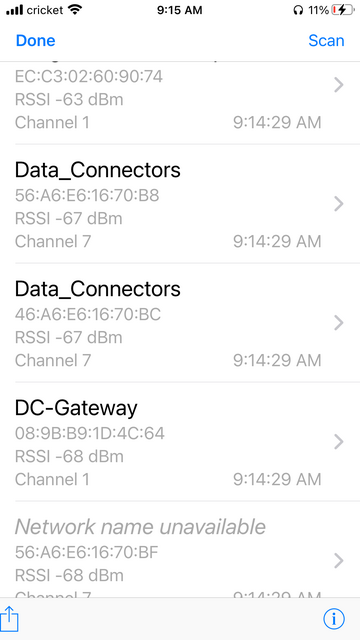
Here is the result of the wifi scan:
Now what does it mean? What are "acceptable" numbers?
I want to run it when I get home tonight because there are spots outside my home wherein I can't connect.
June 14, 2022, 10:07 AM
911Boss
Here is what I found in regards to signal strength
What part of "...Shall not be infringed" don't you understand???
June 14, 2022, 10:13 AM
smschulz
LOL, always knew Apple wasn't serious about ....
quote:
Originally posted by h2oys: I never knew there was a way to measure wifi... Here is the result of the wifi scan:
{snip}
Now what does it mean? What are "acceptable" numbers?
I want to run it when I get home tonight because there are spots outside my home wherein I can't connect.
Keeping it simple ... when your RSSI is below 67dbm then your connection will start to wane. This is not an exclusive number but know the lower the RSSI the better.
FWIW, Wi-Fi is highly technical in total implementation and there are a plethora of factors for the protocol. However, for simplicity I believe you are asking about the signal strength albeit there are many, many factors that can affect performance.
Good Luck
June 14, 2022, 10:39 AM
h2oys
Thanks both 911boss & smschulz!
June 14, 2022, 11:10 AM
Dzozer
Whoo Hoo! Thanks Guys!
So happy to have something like AirPort Utility that works on an iPhone...
'veritas non verba magistri'
June 14, 2022, 11:30 AM
Lefty Sig
Yep Airport Utility. Used that to find out that my (former) GF's cable company WiFi hotspot was set on 2.4 GHZ Channel !, along with every single other person in the neighborhood using the same cable company.
I called them and firmly requested the PW so I could go in and change the channel.


 Just saw that the surrounding hotspots is android only... oh well....