SIGforum
Windows rearranges my Desktop on restart. GRR!
February 19, 2022, 09:29 AM
vthokyWindows rearranges my Desktop on restart. GRR!
I'm so annoyed with this, I'm not even sure how to rant about it properly. Every time there's a system restart, my (Win 10) PC rearranges the icons on the desktop. Every. Stinking. Time.
This is part of the reason I don't restart often, I suppose -- I rely on the sleep function most of the time.
Anyway... every bloody time Windows restarts, it scrambles the icons. Why, Microsoft, just frickin'
why? Do you have some incessant need to screw with our heads and waste our time? I have things grouped such that they work for
me not for
your entertainment, you bunch of weenies!
Politicians seem to have forgotten that they work for us, not the other way around.
— — — — — — — — — — — —
God bless America. February 19, 2022, 09:39 AM
PatenMine doesn't do that. I reboot every day.
February 19, 2022, 09:55 AM
P250UA5Never seen that.
Do you have the desktop set to auto arrange, which will pull all icons to the top left?
Right click desktop, one of the options has auto arrange in it. Try turning that off.
The Enemy's gate is down. February 19, 2022, 10:02 AM
vthokyquote:
Originally posted by P250UA5:
Do you have the desktop set to auto arrange, which will pull all icons to the top left?
Right click desktop, one of the options has auto arrange in it. Try turning that off.
Here's the current setting:
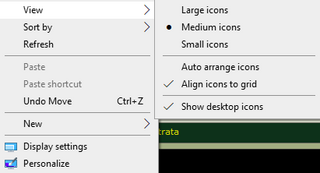
It's not that it brings things top-left, it scrambles them all over the place.
Politicians seem to have forgotten that they work for us, not the other way around.
— — — — — — — — — — — —
God bless America. February 19, 2022, 10:13 AM
PatenHave you searched the internet for possible solutions?
February 19, 2022, 10:24 AM
mark123Do you have the monitor resolution set to a non-native setting? I’m thinking Windows must set it to your choice after it loads the desktop. Windows is still quirky after all these years. I know when I charge monitor resolutions my desktop icons scramble all over the place. Makes no sense.
February 19, 2022, 10:54 AM
skywagDo you change resolutions?
February 19, 2022, 10:58 AM
sigmonkeyTake a look at this.
http://www.midiox.com/desktoprestore.htm
"the meaning of life, is to give life meaning" ✡ Ani Yehudi אני יהודי Le'olam lo shuv לעולם לא עוד February 19, 2022, 02:25 PM
vthokyquote:
Originally posted by mark123:
Do you have the monitor resolution set to a non-native setting? I’m thinking Windows must set it to your choice after it loads the desktop. Windows is still quirky after all these years. I know when I charge monitor resolutions my desktop icons scramble all over the place. Makes no sense.
I don't -- it's 1980x1020 -- but I understand what you're saying. I've seen "the scramble" when connecting my work laptop to an external monitor with different resolution.
quote:
Originally posted by skywag:
Do you change resolutions?
I don't (thankfully).
quote:
Originally posted by sigmonkey:
Take a look at this.
http://www.midiox.com/desktoprestore.htm
Thank you, Mr. Monkey, I'll check it out.
Politicians seem to have forgotten that they work for us, not the other way around.
— — — — — — — — — — — —
God bless America. February 19, 2022, 03:18 PM
Flash-LBI restart every day also and occasionally twice a day.
Never had this happen to me. If it did, it would drive me nuts though.
February 19, 2022, 11:01 PM
airbubbawhy i don't use the desktop + restart every day!
February 20, 2022, 10:29 AM
Expert308Mine doesn't do it normally, but now and then if I add something new - either a file or an app shortcut - to my desktop, it will move it to some seemingly random place. Trick is, in the desktop context menu there's a "Refresh" option. That will "lock" all you desktop icons in their current locations. Until the next time you add something new, anyway. And no, the name of it is not very intuitive.
February 20, 2022, 02:01 PM
Skins2881Mine just did this after an update. I had them all arranged where I want them. Restart, now they are packed tightly in the upper left hand corner. Need to rearrange them on Tuesday.
Jesse
Sic Semper Tyrannis February 20, 2022, 04:37 PM
casMy work computer drives me nuts. Desktop full of shortcut icons for programs I do not, some I can not, use. But I can't remove them. (not without administrative right). Most I have stuck in the corner of my right monitor, out of the way. There are two however that move back to the left side of the left screen. If I move them, in a couple minutes time they move back. If I put other things in that spot, it moves them out of the way and and they go there. Grrrr...
February 20, 2022, 07:10 PM
vthokyThe work PC doesn't often scramble things these days, though my annoyance there comes from [corporate] Big Brother putting shortcuts on my desktop for things I don't need or use. I have a folder for that mess, called "Not needed on the desktop," and I'm constantly overwriting the shortcuts Big Brother farmed down to my PC just days ago.
Politicians seem to have forgotten that they work for us, not the other way around.
— — — — — — — — — — — —
God bless America. April 15, 2022, 08:02 AM
vthokyLike the Energizer bunny, the desktop scramblings just keep going.

Darn you, Microsoft!

Politicians seem to have forgotten that they work for us, not the other way around.
— — — — — — — — — — — —
God bless America. April 15, 2022, 09:45 AM
ZSMICHAELquote:
The work PC doesn't often scramble things these days, though my annoyance there comes from [corporate] Big Brother putting shortcuts on my desktop for things I don't need or use. I have a folder for that mess, called "Not needed on the desktop," and I'm constantly overwriting the shortcuts Big Brother farmed down to my PC just days ago.
^^^^^^^^^^^
This behavior only occurs on the desktops of compulsive people or Engineers.
April 15, 2022, 05:52 PM
vthokyquote:
Originally posted by ZSMICHAEL:
Engineers.

Politicians seem to have forgotten that they work for us, not the other way around.
— — — — — — — — — — — —
God bless America. April 16, 2022, 08:58 AM
tsmccullTry the small freeware program DesktopOK.
http://www.softwareok.com/?seite=Freeware/DesktopOKSeems to work well and has a bunch of configurable parameters so you can probably get it set the way you like it.