
Go | New | Find | Notify | Tools | Reply | |
Res ipsa loquitur |
Simply put, the Starlink Mini just works. It’s easy to setup and use. It’s almost idiot proof. About two weeks ago, I spent 8 days camping with Mrs. BB61 at a family reunion in a national forest in Idaho. We have camped where we went before, and there is no internet or cell phone service for miles. For a variety of reasons, we decided to take Starlink up on their 30 day trial and get a Starlink Mini. I used it extensively for 8 days. One day alone, I had nearly 8 hours straight of video meetings. At times, there was upwards of 12 people with their video on. I also had several other shorter video meetings. My SIL also used the system for work and my wife and a couple of the kids did normal internet and gaming stuff. In all that time, we only had one glitch in the afternoon of my day-long video meeting. In that meeting, I lost my Starlink connection around 3:00 pm in the afternoon. I had to turn off the entire system and reboot everything. Within 5 minutes I was back like nothing had happened. I have had worse system outages on my employer’s system and I wasn’t able to fix their system’s problems. Power: We elected to buy a Jackery Explorer 1500 V2. We got ours from Costco for $599. It also came with a 100W foldable solar panel system. It also comes with the preferred lithium iron battery system. If you use the dedicated AC ports, you use substantially more power than the DC USB-C or cigarette lighter port. The Jackery did heat up by about hour 6 during the day-long Zoom session, which may be why I had the little glitch in the system. To prevent overheating in the future, we bought another Jackery like the first one. The plan is to use one in the morning, let it cool down and use the second in the afternoon. We have 400W of solar panels so we can recharge one while using the other as well. We also used the Starlink while powered by our Honda inverter generators and that was a flawless method. The drawback is it uses gas and is noisier than a large power bank. A 100W solar panel is nowhere near enough to keep the system ahead of power usage if you are streaming video. More importantly, a 100w panel really won’t recharge a larger Jackery in any reasonable amount of time. By my calculations, I would need at least 200W in panels to keep the Jackery’s power in a net gain situation if I’m streaming video. More importantly, you really need 400W to recharge the Jackery in under a day. Setup: I have a 3’ tripod and a clamping system to put the Mini on our RV’s ladder. We used both and both worked well. The advantage of setting the mini up on the RV’s roof ladder is it is out of the way and you don’t have to worry about people tripping over the cable or knocking the tripod over. The disadvantage is potentially falling. We plan on getting a 20-30’ tripod for our next trip and installing it up against the RV. We also plan on installing a Starlink port on the side of the RV like a Cable TV port system. Speed: See the attached screen shot of a speed test I ran. My BIL is a HAM radio operator and has some pretty nice equipment. We both think that having both effectively eliminates any communication problems you might have in an emergency or while traveling. There are limitations with both systems but if I were to only have one system, I would have a Starlink Mini with GFR radios for close communications. I’m still working on getting my General Class HAM license so I can properly use my Baofeng 10W radio. But, in the interim, it’s nice knowing I can reach anywhere in the world at least via text or email and can access news sources at any time and basically anywhere. 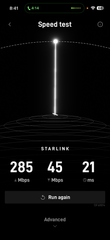 __________________________ | ||
|
| Stupid Allergy  |
Starlink Mini’s have caught my attention too. I’ve thought about picking one up, testing it out.. then just putting in on standby for future use. "Attack life, it's going to kill you anyway." Steve McQueen... | |||
|
| Res ipsa loquitur |
One thing I forgot to mention: You don't have to keep a plan active the entire year. Starlink's $10 a month "Standby Mode" allows you to still have low data text/email communications. From their website: "You can pause your service with Standby Mode, which provides unlimited low-speed data for emergency messaging and easy reactivation in dead zones for a small monthly fee. Important: Standby Mode is not intended for in-motion use." From what I've read, this also includes the ability to call (non video) with apps like Signal, WhatsApp (text only), Wi-Fi calling , basic VoIP audio or low-bitrate voice calls. IOW, it's like a non smartphone line that you can use to communicate at any time anywhere in the United States.This message has been edited. Last edited by: BB61, __________________________ | |||
|
| Powered by Social Strata |
 | Please Wait. Your request is being processed... |
|
© SIGforum 2026